The Hunt for the Perfect Score
As I already hinted at in this blog post, one very special goal was right at the top of my priority list: the performance of this website. There is that one moment in a developer's life when you run your own site through Google PageSpeed Insights for the first time and wait for the result with a mixture of hope and fear. My goal was clearly defined from the start. I wanted to see the magic 100 in all four categories: Performance, Accessibility, Best Practices, and SEO.
The path there felt like a leisurely walk at first, but quickly turned into a digital marathon. While SEO scored full marks on the very first analysis, there were still a few rough edges when it came to accessibility. The main problem was the buttons used to switch between images on the homepage. According to Google's algorithms, they were simply too close together. A classic mobile usability issue: if your fingers are too thick, you tap the wrong thing. So I adjusted the spacing, enlarged the touch targets, and just like that, accessibility jumped straight to 100.
But then came performance. On desktop, everything still looked rosy. A powerful processor and a fast connection forgive many sins. But the mobile view is merciless. It is the final boss of every web optimization effort. Mobile devices often have weaker processors and struggle with unstable network connections. This is where the wheat gets separated from the chaff. Anyone who wants to reach 100 here has to dig deep into the bag of tricks and be willing to question every single byte.
Debugging with a Guilty Conscience
Performance tuning is a very particular kind of debugging. Normally when debugging you are like a detective solving a murder case where you are somehow also the perpetrator. You are looking for the one logical error, the one line of code that brings everything crashing down. When optimizing for speed, the detective role stays the same, but the crime is more subtle. The act was never intentional. You did not deliberately write slow code. You were simply naive. I had been coding away, adding features and pulling in libraries, without ever seriously thinking about metrics like First Contentful Paint or Largest Contentful Paint.
These abbreviations, FCP and LCP, sound like technical gibberish at first, but they determine whether a user stays on the page or bounces away in frustration. First Contentful Paint measures when the first element appears on the screen. Largest Contentful Paint indicates when the main content element has loaded. When these values are in the red, the website feels sluggish and lifeless. My journey into the world of milliseconds began right here.
WebP, Lazy Loading, and the JavaScript Bundle
One of the first lessons I got to learn was about the WebP image format. If you browse around in forums, you will always find voices claiming that WebP is complicated or does not bring much benefit. But my experience was completely different. WebP is absolutely fantastic when it comes to drastically reducing file size while maintaining the same quality. In the past I barely thought about compression. Today I know that every kilobyte counts. An image that weighed 500 kilobytes as a JPEG often shrinks to under 50 kilobytes as WebP, without the human eye noticing any difference.
At the same time, I started pushing the principle of lazy loading to its limits. The idea is simple: only load what the user is currently looking at. Why should the image in the footer be loaded while the user is still reading at the very top of the header? At first I was skeptical about whether you should really delay loading everything. But in the fight for 100 points on a smartphone, this strategy is worth its weight in gold. It relieves the initial bandwidth load and ensures the browser can focus on the important elements that need to be visible right away.
But the biggest challenge was waiting in a place I had completely underestimated: JavaScript bundling. Bundling sounds great in theory. You pack all the small scripts into one large file to minimize the number of server requests. The problem arises when this bundle swells into an unmanageable monster. In my case, I ended up with around 73 kilobytes of unused JavaScript. That sounds like very little at first, but for Google's analysis tools it is an open invitation for point deductions.
The tricky thing about unused code is that you often have no idea where it is coming from. It hides in the depths of the dependencies you have accumulated over the months. You install a library for one small feature, and suddenly you are dragging along a massive package of logic that will never be executed. Hunting down this dead weight in the code was tedious. I had to learn how to use analysis tools that broke down exactly which functions were actually needed and which ones were just taking up space.
Language Files and Double the Ballast
During this process I stumbled upon another, almost embarrassing problem: my language files. Since this website is bilingual, I had initially been loading the German and English texts in a shared package. A classic beginner's mistake. A user reading the German version has no need for the English translations sitting in their browser's memory. The solution was a radical overhaul of the loading structure. Now the language files are loaded strictly separately. Only what is currently active gets loaded. This step alone noticeably improved load times and pushed the performance metrics upward.
But the journey was not over there. While cleaning up my language files, I noticed how carelessly I had been handling external libraries. Over time I had built up quite a collection. The low point was realizing I had installed two completely different libraries for notifications: Toast and Sonner. Both essentially do the same thing, they make little messages pop up at the edge of the screen. Why did I have both in the project? I could not remember anymore. Probably I had tried one out, forgotten to delete the other, and ended up dragging both along.
The crowning irony, however, was that after a closer analysis I had to admit I was not using any notifications on the website at all anymore. I had been loading two libraries competing with each other for resources, for a feature that was not even active. A rude awakening. Removing this dead weight felt like a digital spring cleaning. Every deleted line of code, every removed library was a small victory on the road to the perfect score.
This phase of cleaning up taught me an important lesson about discipline in software development. It is easy to add new things. It is hard to remove things again when you no longer know exactly why they are there. The fear of breaking something often keeps you from cutting radically. But that exact kind of radicalism is necessary if you want to build a website that not only works, but also belongs to the top tier when it comes to speed.
Four Green Circles
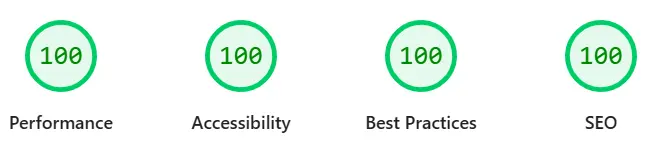
After countless hours of testing, optimizing, and testing again, the moment finally arrived. I pressed the analysis button in PageSpeed Insights once more. The loading bar crept forward. The tension built. And then they lit up one by one: four green circles, each with the number 100 in the middle. A moment of pure relief. It had been a long road, marked by small frustrations and big lessons learned. But in the end I pulled it off, as you can also see in the current PageSpeed Insights Report.
This experience fundamentally changed my perspective on web design. It is no longer just about something looking good. It is about how efficiently the technology behind it works. A fast website is a sign of respect for the user and their time. You are not forcing them to download unnecessary data or wait around for sluggish scripts.
Optimizing for the full score was more than just a technical exercise. It was a deep dive into how modern browsers work. I learned how important the prioritization of resources is. Which scripts need to run immediately? Which ones can wait until the page has finished rendering? These questions sound trivial, but the answers make the difference between a good and an excellent user experience.
Looking back, the decision to tackle SEO and accessibility first was exactly right. These areas form the foundation. Without accessibility you are excluding people, and without SEO nobody will ever find the page. But performance is the engine that drives everything. A car with a great paint job and comfortable seats is worthless if the engine keeps sputtering. My digital engine now purrs like a kitten, and the feeling of having an optimized product out there on the web is priceless.
What fascinated me most in the end was the impact of the small things. You often think you need to swap out the entire framework or rewrite a section from scratch. But most of the time it is the accumulated effects of small corrections. One incorrectly scaled image here, one forgotten script there, and a messy CSS file add up quickly to a delay of several seconds. Anyone who learns to find these small adjustment screws holds the key to performance in their hands.
The process also showed me that you are never truly finished. The web is constantly evolving, new standards emerge, and user expectations keep rising. What earns a 100 today could be a 95 again tomorrow after a new algorithm update. But that is fine. Now that I have the tools and the knowledge, I actually enjoy this continuous improvement process. It is a constant race against your own complacency and toward better technical quality.
To close, I can only advise every developer to take the time and really put their own site under the microscope. Look at what is happening in the background. Understand your JavaScript bundle. Question every library. It is worth it not just for the statistics or the vanity of reaching a perfect score. It is worth it because you become a better programmer along the way. You develop a feel for efficiency that goes far beyond web development. It was a hard road, but cracking 100 on PageSpeed Insights was worth every single step. The website now feels as light on its feet as I always wanted it to. A project is only truly finished when you cannot remove anything else without affecting the function.